Project RAG System

Introduction
This project demonstrates the practical application of LangChain, Retrieval-Augmented Generation (RAG), vector search, embeddings, and locally hosted Large Language Models (LLMs) to build an AI-powered helpdesk assistant for iManage.
Objective
The goal is to create a local conversational assistant that can answer iManage-related questions using information retrieved directly from an iManage knowledge base. This approach helps produce responses that are more relevant, traceable and in official documentation.
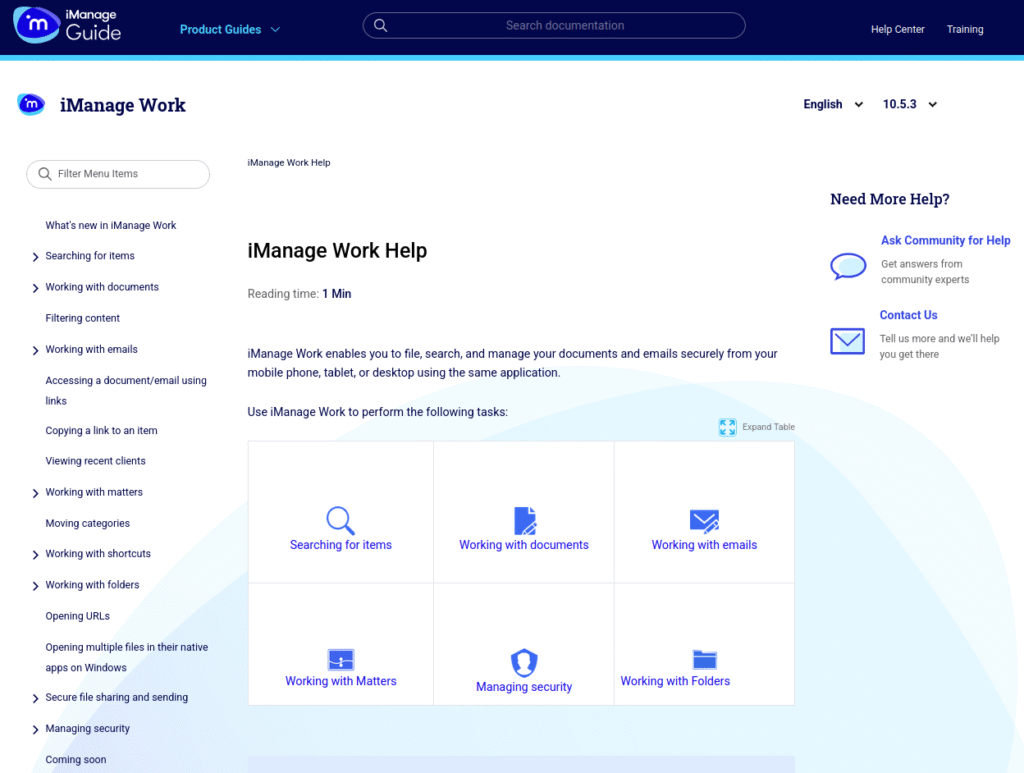
Source : https://docs.imanage.com/work-web-help/10.5.3/en-US/iManage_Work_Help.html
RAG Workflow
1. Knowledge-base extraction - iManage help and knowledge-base content is collected and stored as plain-text documents.
2. Document loading and processing - The extracted text files are loaded into LangChain Document objects along with source metadata.
3. Text chunking - Large documents are divided into smaller overlapping chunks to improve retrieval accuracy.
4. Embedding generation - Each chunk is converted into a numerical vector using the local nomic-embed-text embedding model through Ollama.
5. Vector storage and retrieval - The embeddings are stored in an in-memory vector store, which allows the system to find content semantically related to a user's question.
6. Context-aware generation - The most relevant chunks are provided to the Gemma 4 LLM as context.
7. Grounded responses - The LLM generates an answer based only on the retrieved knowledge-base content and includes the source filename when applicable.
8. Interactive assistant - The complete pipeline is exposed through an interactive command-line chatbot where users can ask questions continuously.
Technology Stack
The project uses the following technologies:
LangChain - Orchestrates document processing, retrieval, tools, and the AI agent.
Ollama - Runs the LLM and embedding models locally.
Gemma 4 - Provides the language-model capabilities for generating responses.
nomic-embed-text -Converts knowledge-base text into embeddings for semantic search.
InMemoryVectorStore - Stores document embeddings and enables similarity-based retrieval.
Python - Provides the overall application and processing logic.
python-dotenv - Manages environment configuration.
Colorama - Provides readable colored output in the notebook/terminal.
1. Install required packages
# ============================================================
# Install packages
# ============================================================
!pip install -U langchain-ollama langchain-chroma langchain-community colorama python-dotenv langchain-text-splitters
| Package | Purpose |
|---|---|
| langchain-ollama | Connects LangChain to your local Ollama models |
| langchain-chroma | Lets LangChain use Chroma vector database |
| langchain-community | Provides additional LangChain integrations/loaders |
| colorama | Adds colored terminal/Jupyter output |
| python-dotenv | Loads settings/API keys from a .env file |
| langchain-text-splitters | Splits your iManage documents into chunks |
2. This cell is your environment and Ollama connection setup. It imports the required libraries, enables colored output, hides common warnings, loads .env settings, then connects to your local Ollama server and prints the models currently available.
# ============================================================
# Environment setup
# ============================================================
import os
import warnings
from getpass import getpass
from dotenv import load_dotenv
from colorama import Fore, Style, init
# Initialize colorama
init(autoreset=True)
# Suppress warnings
warnings.filterwarnings("ignore", category=DeprecationWarning)
warnings.filterwarnings("ignore", category=UserWarning)
# Load environment variables from .env file
load_dotenv(override=True)
# Check connection to local Ollama
import ollama
models = ollama.list()
print(f"{Fore.GREEN}Ollama connected.{Style.RESET_ALL}")
print(f"{Fore.CYAN}Available models:{Style.RESET_ALL}")
for model in models["models"]:
print(f" - {model['model']}")
3. This cell initializes LLM (Large Language Model) Gemma 4 running locally through Ollama.
# ============================================================
# Initialize LLM
# ============================================================
from langchain.chat_models import init_chat_model
model = init_chat_model(
"gemma4:latest",
model_provider="ollama",
temperature=0,
timeout=30,
max_retries=3,
)
#note : temperature=0 → makes responses more consistent and less creative.
4. This cell creates the folder where your iManage knowledge-base documents are stored.
# ============================================================
# Setup data directory
# ============================================================
from pathlib import Path
DATA_DIR = Path("./data/imanage/")
DATA_DIR.mkdir(parents=True, exist_ok=True)
print(f"{Fore.GREEN}Data directory: {DATA_DIR.resolve()}{Style.RESET_ALL}")
5. This code loads all .txt iManage knowledge-base files into LangChain Document objects, storing the file content in page_content and the filename/path in metadata. It also checks that the data directory exists and that at least one .txt file was found before continuing.
# ============================================================
# Load extracted imanage kb as LangChain Documents
# ============================================================
from langchain_core.documents import Document
def load_text_documents(directory: Path) -> list[Document]:
"""Load every .txt file as a LangChain Document."""
if not directory.exists():
raise FileNotFoundError(
f"Data directory not found: {directory.resolve()}"
)
documents: list[Document] = []
for file_path in directory.glob("*.txt"):
text = file_path.read_text(encoding="utf-8")
documents.append(
Document(
page_content=text,
metadata={
"source": file_path.name,
"file_path": str(file_path),
},
)
)
if not documents:
raise ValueError(
f"No .txt files were found in {directory.resolve()}"
)
return documents
documents = load_text_documents(DATA_DIR)
print(f"{Fore.GREEN}Documents loaded: {len(documents)}{Style.RESET_ALL}")
for doc in documents:
print(f" - {doc.metadata['source']} ({len(doc.page_content):,} chars)")

6. This code splits the loaded iManage documents into 350-character chunks with 60-character overlap, then uses Ollama’s nomic-embed-text model to convert each chunk into embeddings and stores them in an in-memory vector store for similarity search. It then creates a retriever that returns the top 4 most relevant chunks for each user question, and prints basic information about the documents and chunks.
# ============================================================
# Split documents and create vector store
# ============================================================
from langchain_core.vectorstores import InMemoryVectorStore
from langchain_ollama import OllamaEmbeddings
from langchain_text_splitters import RecursiveCharacterTextSplitter
# Split documents into chunks
splitter = RecursiveCharacterTextSplitter(
chunk_size=350,
chunk_overlap=60,
)
chunks = splitter.split_documents(documents)
# Initialize embeddings using Ollama
embeddings = OllamaEmbeddings(
model="nomic-embed-text",
base_url="http://localhost:11434",
)
# Create vector store
vector_store = InMemoryVectorStore(embedding=embeddings)
vector_store.add_documents(chunks)
# Create retriever
retriever = vector_store.as_retriever(
search_kwargs={"k": 4}
)
print(f"{Fore.GREEN}Documents: {len(documents)}{Style.RESET_ALL}")
print(f"{Fore.GREEN}Chunks: {len(chunks)}{Style.RESET_ALL}")
print(f"{Fore.CYAN}Sample metadata: {chunks[0].metadata}{Style.RESET_ALL}")
print(f"{Fore.CYAN}Preview: {chunks[0].page_content[:200]}...{Style.RESET_ALL}")

7. This system prompt controls how Gemma 4 behaves as your iManage Helpdesk Assistant. It tells the model to answer only from retrieved RAG context, cite the source filename, avoid making up information, and provide clear support-style answers.
The two important placeholders are:
{context} - the chunks retrieved from your vector store.
{question} -the user's actual question.
# ============================================================
# System prompt - iManage Helpdesk Assistant
# ============================================================
prompt = """You are a friendly and knowledgeable Helpdesk Support Specialist for the iManage document management system.
Your role is to help users resolve issues, answer questions, and guide them through iManage features using ONLY the information provided in the retrieved context.
Guidelines:
- Always be patient, professional, and supportive in tone.
- Base every answer strictly on the retrieved context from the iManage knowledge base.
- Cite the source filename in square brackets when you use information from it.
- If the answer is not found in the retrieved context, say so honestly and suggest the user contact iManage support or check official documentation ,
visithttps://docs.imanage.com/work-web-help/10.5.3/en-US/iManage_Work_Help.html
- Do not invent steps, features, or facts that are not in the context.
- Keep answers clear, practical, and focused on the user's question.
- Use numbered steps when explaining a procedure.
Retrieved context:
{context}
User question:
{question}
Your helpful response:"""
8. This function takes the chunks retrieved by your RAG and formats them into text that can be given to the LLM. It adds the source filename so Gemma 4 can understand where the information came from and cite it in the final answer.
# ============================================================
# Format retrieved documents with filename labels
# ============================================================
def format_documents(docs: list[Document]) -> str:
"""Format retrieved documents with filename labels."""
if not docs:
return "No relevant context was retrieved."
formatted = []
for position, doc in enumerate(docs, start=1):
source = doc.metadata.get("source", "unknown")
formatted.append(
f"[Document {position}: {source}]\n"
f"{doc.page_content}"
)
return "\n\n".join(formatted)
9. This code creates a search tool that connects your RAG retriever to the LangChain agent. When the agent receives a question, it can call this tool to search the vector store, retrieve the most relevant chunks, and return their content and source information to the LLM.
# ============================================================
# Create search tool
# ============================================================
from langchain.tools import tool
@tool
def search_knowledge_base(query: str) -> str:
"""Search the knowledge base for relevant documents and return their content."""
retrieved_documents = retriever.invoke(query)
if not retrieved_documents:
return "No relevant documents were found."
return format_documents(retrieved_documents)
10. This code creates the LangChain agent that brings your RAG components together. It gives the agent the Gemma 4 model, your search_knowledge_base tool, and the system prompt, allowing it to decide when to search the iManage knowledge base and then generate a grounded answer.
# ============================================================
# Create agent
# ============================================================
from langchain.agents import create_agent
agent = create_agent(
model=model,
tools=[search_knowledge_base],
system_prompt=prompt,
)
print(f"{Fore.GREEN}Agent created successfully{Style.RESET_ALL}")
Agent created successfully
11. This cell defines five test questions that you will send to your iManage RAG agent. Each question is stored as a separate item in the questions list, which your loop will process one by one to test how well the RAG retrieves information and generates answers.
# ============================================================
# Test questions - iManage knowledge base
# ============================================================
questions = [
"Why is my document checked out or locked?",
"How do I find or share an email in iManage?",
"How do I send a secure link to an external user?",
"How do I search for a document in iManage?",
"Can't access a document in iManage?",
]
12. This code runs all five test questions automatically instead of testing only one question at a time. For each question, it sends the question to your agent, gets the final answer, and prints the question and answer clearly in the notebook.
# ============================================================
# Run all test questions
# ============================================================
for question in questions:
result = agent.invoke(
{"messages": [{"role": "user", "content": question}]},
)
answer = result["messages"][-1].content
print(f"{Fore.CYAN}Question: {question}{Style.RESET_ALL}")
print(f"{Fore.GREEN}Answer:{Style.RESET_ALL}")
print("-" * 70)
print(answer)
print("-" * 70)
print()
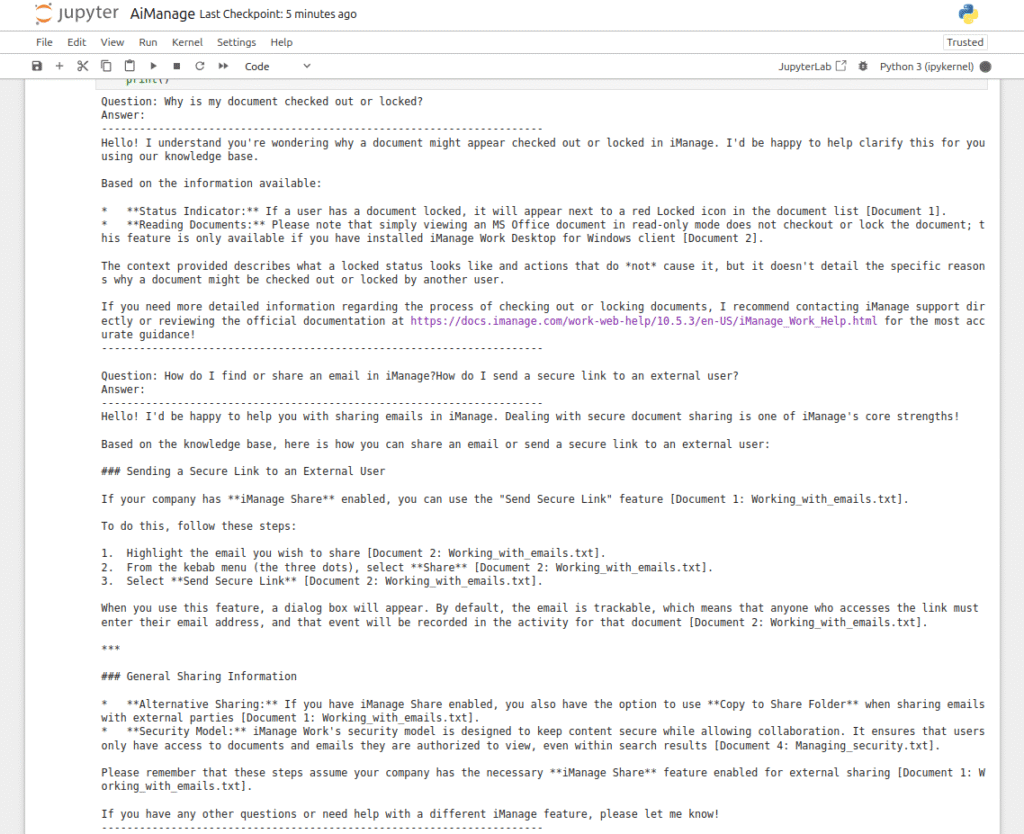
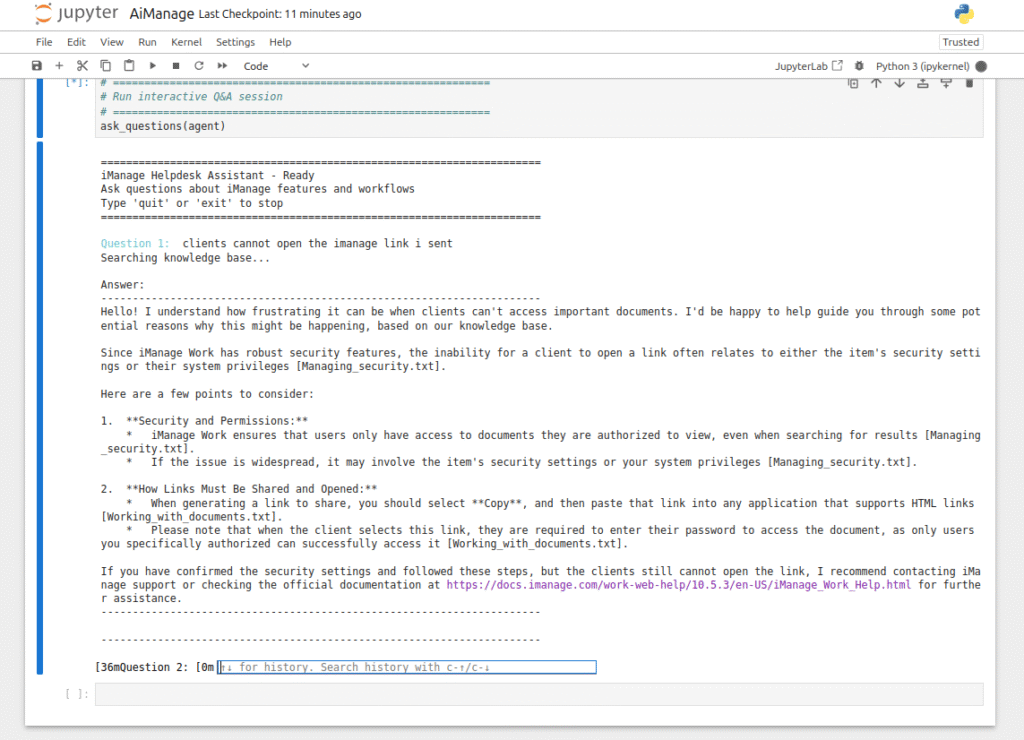
13. This function turns your RAG into an interactive iManage Helpdesk chatbot. Instead of using a fixed list of questions, the user can type questions continuously, the agent searches the knowledge base and returns an answer, and typing quit, exit, or q ends the session.
# ============================================================
# Interactive Q&A function
# ============================================================
def ask_questions(agent) -> None:
"""Interactive Q&A session with the iManage helpdesk agent."""
print("\n" + "=" * 70)
print(f"{Fore.CYAN}iManage Helpdesk Assistant - Ready{Style.RESET_ALL}")
print(f"{Fore.YELLOW}Ask questions about iManage features and workflows{Style.RESET_ALL}")
print("Type 'quit' or 'exit' to stop")
print("=" * 70 + "\n")
question_count = 0
while True:
question = input(f"{Fore.CYAN}Question {question_count + 1}: {Style.RESET_ALL}")
# Exit commands
if question.lower() in ['quit', 'exit', 'q']:
print(f"\n{Fore.YELLOW}Goodbye! {Style.RESET_ALL}")
break
# Skip empty input
if not question.strip():
print(f"{Fore.YELLOW}Please enter a question.{Style.RESET_ALL}")
continue
try:
print(f"{Fore.YELLOW}Searching knowledge base...{Style.RESET_ALL}")
result = agent.invoke(
{"messages": [{"role": "user", "content": question}]},
)
answer = result["messages"][-1].content
question_count += 1
print(f"\n{Fore.GREEN}Answer:{Style.RESET_ALL}")
print("-" * 70)
print(answer)
print("-" * 70)
print("\n" + "-" * 70 + "\n")
except Exception as e:
print(f"{Fore.RED}Error: {e}{Style.RESET_ALL}")
14. Lastly launch RAG Helpdesk Assistant.
# ============================================================
# Run interactive Q&A session
# ============================================================
ask_questions(agent)

Related Posts

My Journey into Open AI: Exploring K2 Horizon

Jarvis AI Voice Assistant Project